Projects / LS Portal
One portal for assets, contracts, GDPR and cybersecurity
LS Portal is an administrative portal for companies and institutions that runs in the browser on your own server. Asset records with phone-based stocktaking, GDPR, contract and certificate registers and the obligations of the KSC Act (NIS2) — in one place, with a single login. The system keeps track of deadlines and sends e-mail reminders.
Why LS Portal
Order in the registers your organization keeps every day
One portal instead of many tools
Registers kept today by different people in different files move to one portal — with a shared login, a dashboard with tiles and a “My tasks” list.
Deadlines watched by the system
E-mails before contracts end and before notice deadlines, before certificates expire, about deadlines for incident reports to CSIRT and the data protection authority, and about ISMS implementation tasks.
Ready for audits
Up-to-date authorization records, the incident and breach register, ISMS documentation with evidence, asset change history and the audit log — at hand, without compiling files.
Working with lists like in a spreadsheet
Search, filters, choosing and ordering columns and export to Excel and PDF on every list — employees do not have to learn a new way of working.
Modules
Assets, contracts and certificates every day
Asset records and change documents
Records of fixed assets, equipment and intangible assets with a field-by-field change history. OT, ON, MT, LT and DM documents with an approval workflow, PDF printouts and Word export. Tax and balance-sheet depreciation calculated separately, with a depreciation plan, an accumulated depreciation statement and the option to reverse a run.
Integration with the Insert system
Fixed and intangible assets are synchronized with the Insert system (Rewizor GT), so accounting and asset records work on the same data, without manual retyping.
Barcode and QR code inventory
Barcode or QR labels printed one by one or as whole sheets. Stocktaking with a phone instead of ticking off lists, and ready printouts for the committee at the end: the count sheet plus shortage, surplus, difference and relocation reports.
LS Portal Mobile app
Android phones shared by the stocktaking team: everyone signs in with their own login and PIN, and each item records who scanned it and on which device. A phone is paired with the portal using a QR code, and a lost one can be disconnected with one click.
Contract register
Contracts with counterparties, annexes and attachments. The system calculates the last day to decide on termination and sends e-mails 60, 30, 14, 7 and 1 day before the contract ends and before that deadline.
Certificate register
SSL certificates, qualified signatures and AS2 certificates. Expiry date, issuer and serial number read from the uploaded file, warnings 30, 14, 7 and 1 day before expiry, and a daily check that the server is running the certificate on record.
Personal data protection
GDPR — complete documentation in one module
The GDPR module keeps the data protection documentation required by the GDPR and the Polish Personal Data Protection Act. Documents that used to circulate on paper in the organization are signed and confirmed in the system, and reminders keep track of deadlines. The data controller, IT security administrator, data protection officer, HR and managers each work in it with permissions matched to their role.
Authorizations with a workflow
A manager creates the authorization, the data controller signs it and the IT security administrator grants logins and approves it — every step lands in “My tasks” and in e-mail. The employee confirms the confidentiality statement in the system.
Record of processing activities
The record under Art. 30(1) and the record of categories under Art. 30(2): purposes, legal bases, categories of data subjects and data, recipients and erasure periods. A PDF printout ready for the supervisory authority.
Data subject requests
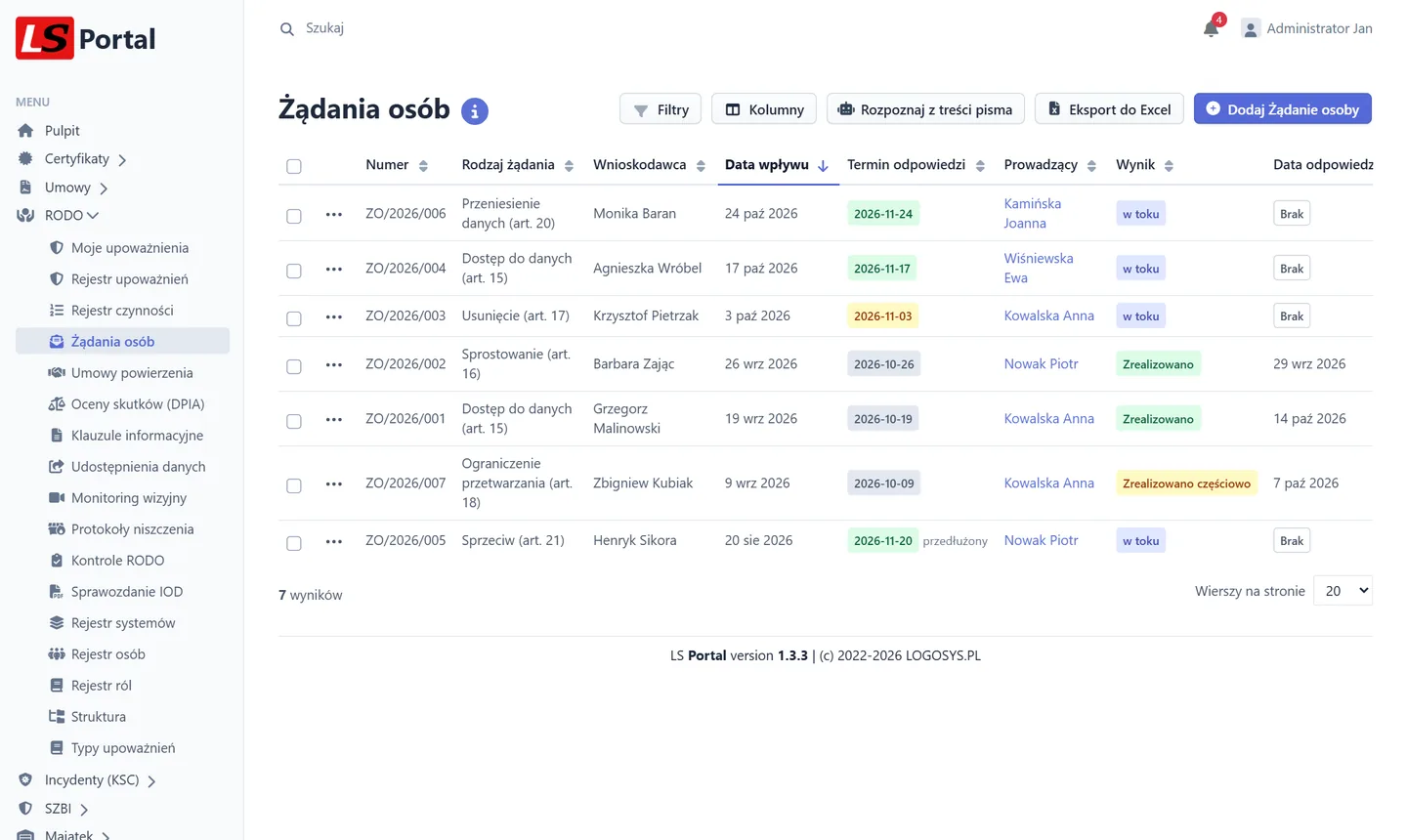
Access, rectification, erasure, objection and other requests under Art. 15–22 with an automatic number and response deadline — one month, three when extended — and reminders before it expires.
Data processing agreements
Art. 28 agreements with sub-processing and the audit date, linked to the contract register and ICT suppliers, with a reminder 30 days before expiry.
Data protection impact assessments (DPIA)
WP248 high-risk criteria with a hint whether an assessment is required, residual risk, the DPO's opinion, approval by the data controller, a review reminder and a PDF printout.
Information notices
Art. 13 and 14 notice templates with versions and effective dates. A draft is generated with one click from the record of processing activities.
Data disclosures
Requests from courts, police, bailiffs or the social insurance institution with the legal basis, scope of data and decision — including disclosures of surveillance recordings.
Video surveillance
A camera register with the purpose, area and recording retention period. The system warns when the period exceeds 3 months.
Destruction reports
Destruction of documents and media with a DIN 66399 security level. Each committee member confirms the report in the system, and the report can be linked to an asset disposal in the Assets module.
Audits and the DPO report
A plan and results of audits with reminders for the person in charge, plus the annual data protection officer report in PDF, compiled automatically from system data.
People, systems and roles
Employee records with an organizational structure and shared positions. Managers see only their own employees, and each employee sees their own authorizations.
AI assistant
Suggests how to complete processing activities and a preliminary impact assessment, and recognizes a data subject request in a pasted letter and drafts a reply. Data is masked, and suggestions must be approved.
Data breaches (Art. 33 and 34 GDPR) are recorded in the Incidents (KSC) module, and policies, training and risk analysis in the ISMS module.
New · KSC and NIS2 cybersecurity
KSC Act obligations — handled step by step
The amended National Cybersecurity System Act, implementing the NIS2 directive, has been in force since 3 April 2026. Essential and important entities must run an information security management system with risk assessment, report incidents within strict deadlines and keep documentation ready for audits, and management is accountable for these obligations. Two LS Portal modules guide you through it step by step.
Incidents reported on time, not after the deadline
- Any employee reports an event in a minute from a dashboard tile, and the people in charge get an e-mail right away.
- Early warning within 24 h, notification within 72 h and a final report for CSIRT, plus breach notification to the data protection authority within 72 h — deadlines calculated automatically, with reminders before they expire.
- Ready report content laid out in the fields required by law — to copy or download as PDF.
- The system will not let you close a major incident or a data breach without the required reports to the authorities being recorded.
- Evidence with SHA-256 checksums, a tamper-proof change history and the breach register required by Art. 33(5) GDPR in PDF.
- Integration with SIEM/SOC (Wazuh, QRadar, Splunk, Elastic and more) — without passing on personal data.
An information security management system without an army of consultants
- The implementation wizard builds a plan with deadlines, and the “What to do now” list suggests the next step every day.
- A catalogue of the Act's Art. 8 requirements for essential and important entities, with plain-language explanations and a compliance score.
- Automatic evidence: every day the system checks SPF, DKIM and DMARC mail records, inactive Active Directory accounts and vendor end-of-support dates.
- Document templates — security policy, incident procedure, cyber hygiene and more — generated as DOCX with the organization's data.
- Cyber hygiene e-learning with a knowledge test created in one click, including tracking of the head of office's training.
- A risk register with a 5×5 matrix and typical threat suggestions for each asset, plus ICT asset and supplier registers with a security questionnaire.
- A ZIP package for auditors, a PDF report for management and tracking of security audit deadlines.
An AI assistant that never sends data outside
Incident classification, report summaries, requirement completeness checks and draft ISMS review conclusions are prepared by a language model running on a server in your network. PESEL numbers, e-mail addresses and phone numbers are masked, and every suggestion must be approved by an employee.
The ISMS module can be tried without a licence in a demo version.
KSC Act obligations step by stepIntegrations and security
Plugged into the company's existing infrastructure
On a domain network, an employee signed in to their computer enters the portal without typing a password again (SSO), and accounts are synchronized with Active Directory — new ones are created automatically, and those removed from the directory are disabled. Without a domain, regular local accounts work.
Every module offers data export to Excel and PDF, and access roles match the organization's structure — employees, managers, information security administrators and data protection officers each see different views.
The audit log shows who viewed or changed sensitive data and when, and further modules are enabled with a new licence file — without reinstallation or downtime.
AD
login and synchronization with Active Directory
PL/EN
a fully bilingual work environment
7
modules in one system
100%
Excel/PDF exports available directly from the browser
Deployment and licensing
Installed on your server, licensed without an account limit
Turnkey deployment
Installation on the company's server, migration of existing asset records, permission setup and staff training.
A licence for the whole organization
The licence covers all employees — no extra charges for additional accounts. A one-off deployment fee and an annual support fee.
Modules to choose from
Each module is licensed separately: you choose only what you need and add more at any time. Packages make deployment and support up to 20% cheaper.
Built-in update installer
The system checks for new versions by itself. The administrator installs them independently from the panel — right away or at a chosen time. The installer downloads a signed package, backs up the database and files, and restores the previous version automatically if anything goes wrong.
Task scheduler
Recurring tasks — update checks, Active Directory synchronization, deadline notifications and ISMS checks — are enabled in the administration panel and registered in Windows Task Scheduler or crontab with one click, without manual server configuration.
Support and remote assistance
Annual support includes the Help Desk, access to new versions — including KSC requirement catalogue updates after changes in the law — and a connection to a consultant started from the system menu, with the user's consent.
Remote supportFrequently asked questions
Questions and answers
Do I have to buy all modules?
No. Each module is licensed separately. You start with the ones you need and add more later with a new licence file, without reinstallation.
Does LS Portal work with accounting software?
Yes. Asset records are synchronized with the Insert system (Rewizor GT). We build integrations with other systems on request.
Where is the data stored?
On your server. We install LS Portal in the client's infrastructure, and the data never goes to the cloud or to third parties.
Does the system work without an Active Directory domain?
Yes. On a domain network, Windows sign-in and account synchronization are available, and without a domain regular accounts with a login and password set by the administrator work.
Is the number of accounts limited?
No. The licence covers all employees, with no extra charges for additional accounts.
How do updates work?
With active support, the system checks for new versions by itself and notifies the administrator. Updates are installed independently from the administration panel — right away or at a scheduled time — with an automatic database and file backup and rollback to the previous version if anything goes wrong. The list of changes in each release is available in the system itself.
Does the AI assistant send data outside?
No. The language model runs on a server in your network (e.g. a virtual machine with 8 vCPU, 16 GB RAM and 40 GB of disk), and PESEL numbers, e-mail addresses and phone numbers are masked. Other features need no extra hardware.
Can I try the ISMS module before buying?
Yes. Without a licence the module runs as a demo: the dashboard, wizard, requirement catalogue, documents, training and AI assistant are available, and registers are limited to 3 entries.
Are you keeping similar registers by hand?
We will show you how LS Portal can take the load off your team — let us talk about deployment in your organization.
Contact us